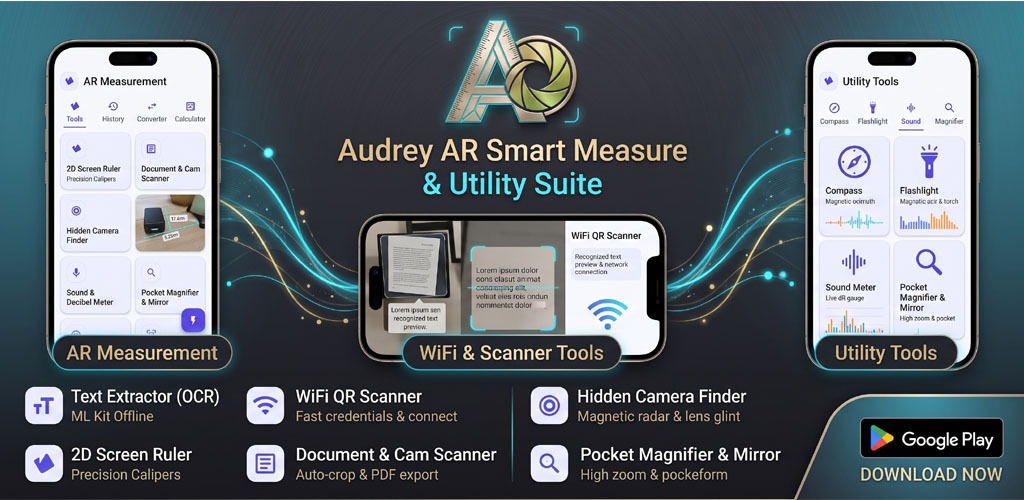
Explore Audrey AR Smart Measure & Utility Suite. A detailed review of its AR ruler, offline OCR, WiFi QR scanner, hidden camera finder, and sound meter.
Modern smartphones are packed with sophisticated hardware sensors—magnetometers, optical lenses, dual microphones, and gyroscope units. Yet, most users only tap into a fraction of these capabilities because the native tools are either buried or missing entirely.
To bridge this gap, all-in-one utility toolboxes have become indispensable. One notable app in this category is Audrey AR Smart Measure & Utility Suite (Package: com.audrey.ar.augmented.reality.camera).
Instead of cluttering your phone with separate apps for QR scanning, PDF digitization, sound measurement, compass navigation, and unit calculations, Audrey AR combines these daily productivity tools under one lightweight dashboard.
In this comprehensive review, we conduct an exhaustive, hands-on walkthrough of every tool and feature in the Audrey AR suite, examine how each module works, and help you decide if it deserves a permanent spot on your device.
App Overview & Specifications
- App Name: Audrey AR Smart Measure & Utility Suite
- Package Identifier:
com.audrey.ar.augmented.reality.camera - Download Source: Google Play Store
- Core Architecture: Material UI Dashboard with 4 Main Tabs (Tools, History, Converter, Calculator)
- Measurement Systems: Imperial (with configurable eye-height calibration, e.g., 4′ 7.1″) and Metric standards
- Category: Android Smart Utilities & Measurement
In-Depth Feature Breakdown: The Complete Tool Suite
The home screen of Audrey AR organizes 8 specialized utilities in a clean 2-column grid, accompanied by dedicated measurement calibration and calculation tabs at the top. Here is how each module performs:
Find: Nomao camera Pro
1. Text Extractor (OCR) – ML Kit Offline Recognition
The Text Extractor leverages on-device Machine Learning (Google ML Kit) to extract editable text from books, business cards, receipts, and signs.
- Completely Offline: Unlike web-dependent OCR tools, processing is handled locally on your phone’s chip, ensuring high-speed recognition and total data privacy.
- Direct Export: Extracted text can be copied to your clipboard, edited in place, or shared across messaging and note apps with a single tap.
2. WiFi QR Scanner – Fast Credentials & Connect
Manual password entry for complex Wi-Fi networks is frustrating.
- Instant Wi-Fi Handshake: This scanner decodes standard WPA/WPA2/WPA3 network strings embedded in QR codes.
- Auto-Connect Capability: Rather than just displaying the SSID and password as plain text, it lets you authenticate and connect directly to the hotspot from within the application.
3. 2D Screen Ruler – Precision Glass Calipers
Need to measure small physical items like screws, coins, or jewelry?
- On-Glass Calipers: Turns your smartphone display into a calibrated digital caliper.
- Sub-Millimeter Precision: Dual slide guides allow you to pinch and drag measurement markers, providing accurate millimetric and fractional-inch readings directly against the touchscreen glass.
4. Document & Cam Scanner – Auto-Crop & PDF Export
Turn your mobile camera into a pocket flatbed scanner:
- Edge Detection & Auto-Crop: The camera automatically pinpoints document corners, straightens perspective skew, and removes shadows.
- Multi-Page PDF Generation: Save multi-page contracts, class notes, or purchase receipts into clean, shareable PDF documents.
5. Audrey AR Smart Measure: Hidden Camera Finder – Magnetic Radar & Lens Glint
Designed for privacy-conscious travelers checking hotel rooms, Airbnbs, or changing areas:
- Magnetic Sensor Radar: Utilizes the smartphone’s built-in magnetometer (compass sensor) to detect anomalous electromagnetic fields typically emitted by hidden circuitry and micro-transmitters.
- Optical Lens Glint Filter: Applies high-contrast visual filters through the camera viewfinder to help you spot light reflecting off convex camera lenses hidden inside smoke detectors, clocks, or wall fixtures.
6. Compass & Flashlight – Magnetic Azimuth & Torch
A reliable outdoor navigation pair:
- Precise Magnetic Azimuth: Delivers real-time bearing readouts, degrees, and cardinal coordinates using the hardware compass.
- Integrated Torch Controls: One-touch toggle for the rear LED flashlight, eliminating the need to swipe down the notification shade while navigating in low-light conditions.
7. Sound & Decibel Meter – Live dB Gauge & Waveform
Measure surrounding acoustic pressure in real time:
- Real-Time Sound Pressure Monitoring: Employs the phone’s microphone array to calculate ambient sound levels in decibels ($dB$).
- Live Waveform Visualizer: Displays dynamic audio waves alongside min/max peak indicators, useful for evaluating home acoustics, workplace noise compliance, or appliance sound levels.
8. Pocket Magnifier & Mirror – High Zoom & Pocket Mirror
- Macro Zoom Camera: Digitally amplifies tiny details—such as small product labels, serial numbers, or motherboard components—using a stabilized viewfinder with quick torch illumination.
- Front Mirror View: A fast-loading front-facing camera profile optimized for quick personal grooming checks on the go.
Beyond the main diagnostic grid, the top dashboard provides seamless access to four essential workflow modules:
- Tools: The primary launchpad for all camera, sensor, and optical utilities.
- History: Automatically archives past scan results, OCR extractions, and measurement logs so you never lose crucial data.
- Converter: Comprehensive unit conversion for length, area, weight, pressure, and temperature.
- Calculator: A fast computational tool built right into the app, eliminating the need to switch out to standard system apps during projects.
- System Toggle (Imperial / Metric): Includes specialized eye-height calibration (e.g.,
Eye Height: 4' 7.1" - Imperial), which provides a baseline reference for elevation and height-estimation measurements.
Performance Comparison: Audrey AR vs. Standalone Single-Use Apps
| Feature / Criteria | Audrey AR Smart Measure | Generic Standalone Tool Apps |
| Storage Consumption | Compact (~1 App footprint) | High (Requires 6–8 separate apps) |
| OCR Mode | Offline ML Kit (Private) | Often requires server uploads |
| Sensory Suite | Radar, dB Meter, Compass, Ruler | Fragmented across multiple downloads |
| Unit System | Instant Metric/Imperial Toggle | Fixed or requires custom settings |
| History Log | Unified central log | Disjointed across different apps |
Pros & Cons
Pros
- All-in-One Utility: Replaces up to eight standalone apps, saving internal storage and memory overhead.
- Offline Privacy: On-device machine learning for OCR ensures your documents stay private.
- Practical Travel Toolkit: The combination of a Hidden Camera Finder, Torch, and Compass makes it an ideal travel utility.
- Clean UI Design: Modern, uncluttered card-based interface with straightforward labels.
Cons
- Hardware Dependent: The decibel meter and hidden camera finder rely directly on your specific phone’s microphone quality and magnetometer accuracy.
- Ad-Supported: The free tier includes ad placements (such as test/banner ads shown at the bottom of the interface).
Frequently Asked Questions (FAQs)
Is Audrey AR Smart Measure & Utility Suite free to use?
Yes, the application is freely accessible on the Google Play Store and supported through standard mobile advertisements.
Can the decibel meter replace professional sound equipment?
While the app provides accurate relative acoustic readings for daily tasks and home testing, mobile phone microphones are not factory-calibrated for certified industrial safety compliance.
How do I install the official version?
You can download the app directly from Google Play by visiting the Audrey AR Play Store Link.
Final Verdict
Audrey AR Smart Measure & Utility Suite delivers an impressive, feature-dense utility toolkit directly to Android users. By combining everyday essentials like offline OCR and QR network tools with hardware-driven utilities like the hidden camera radar and decibel meter, it serves as a genuine digital Swiss Army knife for home, travel, and DIY projects.
If your device is cluttered with single-purpose utility apps, this all-in-one suite is well worth the download.